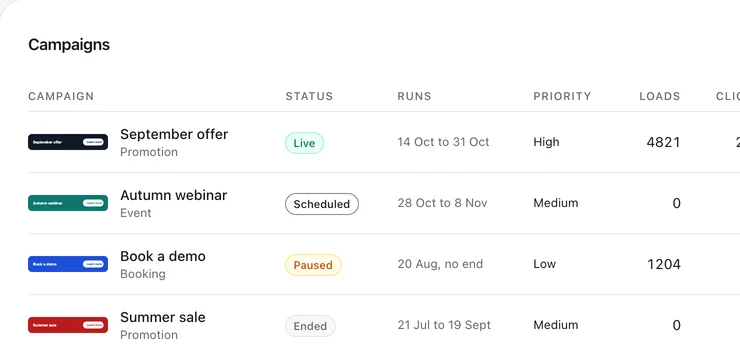
How a signature campaign works
A banner under your signature reaches everyone you write to, on every email. A campaign is a banner with dates: it starts on one day, ends on another, and while it runs it takes the banner's place. With campaigns switched on, your signature carries one slot that Animated Signature fills at the moment an email is opened, with whichever campaign is live then. Between campaigns, the slot shows your own banner, or nothing.
Twelve months of ideas
Each idea has an example banner, kept within the 40 characters a headline and the 28a button can take, and the campaign type that fits it.
| Month | Idea | Example banner | Type |
|---|---|---|---|
| January | Plans for the year, and a first call to start them. UK accountants can remind clients of the Self Assessment deadline. | Tax returns are due on 31 January Send your documents | Booking |
| February | Early bookings for spring and summer: holidays, venues and events. | Spring dates are filling up Book yours | Booking |
| March | The end of a season or a quarter, and offers that end with it. | Spring offer ends on 31 March Claim the offer | Promotion |
| April | Events and open days ahead of the summer. | Open day, 25 April Save your place | Event |
| May | Hiring for the summer, and graduate roles. | Now hiring: summer associates See the role | Recruitment |
| June | Summer hours, and a look at the half year. | Our summer hours, from 1 June Find out more | Announcement |
| July | Who to contact while people are away, and holiday cover. | Away in August? Here is who to call See who to contact | Announcement |
| August | A new term for schools and families, and early plans for autumn. | The new term starts on 3 September Read the letter | Content |
| September | Launches, open days and new collections as the season turns. | The autumn collection is here See the collection | Product |
| October | Webinars and talks, and planning for the year ahead. | Live briefing, 15 October Save your seat | Event |
| November | Seasonal offers ahead of December, and for shops, the late November sales. | Winter offers, until 30 November Shop the offer | Promotion |
| December | Opening hours over the holidays, and a thank you for the year. | Our holiday opening hours See the dates | Announcement |
The January banner is for firms whose clients file a UK Self Assessment return: online returns, and the tax owed, are due by 11.59pm on 31 January. Change the dates in the others to your own.
Ideas for any month
Not every month has a date worth a banner. These suit any of them, and fill the gaps.
- A review, after a project or a stay. "Enjoyed working with us? Tell us", with Leave a review, as a custom campaign.
- Your newest case study or post. "Our newest case study is live", with Read it, as a content campaign.
- A booking page, for the gaps between dated campaigns. "Twenty minutes on your plans", with Book a call, as a booking campaign.
- A channel worth following. "New work every Friday", with Follow us, as a social campaign.
Scheduling them
Campaigns come in nine types (Promotion, Content, Product, Event, Booking, Social, Announcement, Recruitment, Custom), and each has a start date, an optional end date and a priority: high, medium, low. Dates are whole days in your own time zone: a campaign starts at the beginning of its first day and ends at the end of its last.
Campaigns may overlap. When two are live at once, the slot shows the higher priority, then the one that started more recently, so a short, important campaign can sit on top of a long one without you ending it. Plan the year once, and each campaign comes and goes on its dates.
Switching campaigns on reaches a signature already in your mail client only once you copy it again, because the slot has to be in it. After that, nothing about a campaign needs a copy.
Knowing which worked
Each campaign gets its banner loads, its clicks and its click-through rate on the dashboard and the Analytics page, which also compares click-through rate by campaign type. Loads are approximate, because some mail apps fetch pictures before anybody reads the email, so judge a campaign by its clicks and compare it with the same campaign type last time.